Create Realz Casino Mobile Shortcut - Quick Access Guide
Get instant access to Realz casino mobile shortcut NZ gaming with just one tap! Creating a home screen shortcut gives you lightning-fast access to all your favorite games, promotions, and account features. Follow our simple step-by-step guide to add Realz Casino to your mobile device's home screen for the ultimate convenience.
iOS Safari Shortcut Instructions
Transform your iPhone or iPad into a realz mobile app download experience:
Step-by-Step for iOS:
- Open Safari and navigate to realz.co.nz
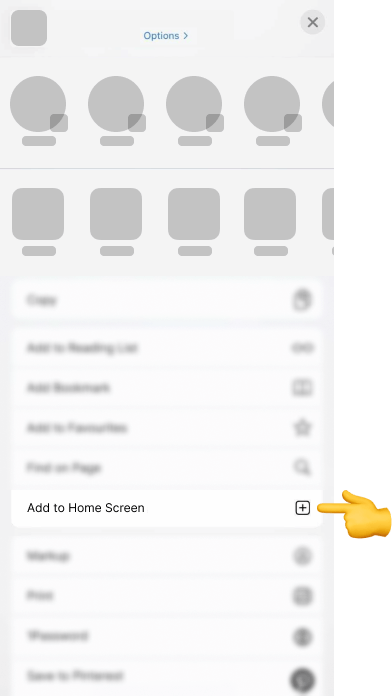
- Tap the Share button (square with arrow pointing up)
- Scroll down and select "Add to Home Screen"
- Customize the name (we recommend "Realz Casino")
- Tap "Add" in the top-right corner
Find your shortcut on the home screen with the Realz logo
iOS Benefits:
- Full-screen gaming without browser bars
- Faster loading times than bookmarks
- Push notification support for promotions
- Seamless integration with iOS features
- App-like experience without App Store downloads
Your casino shortcut new zealand will look and feel like a native app while providing instant access to our complete gaming platform.
Android Chrome Shortcut Setup
Create your realz home screen app on Android devices:
Android Instructions:
- Open Chrome browser and visit realz.co.nz
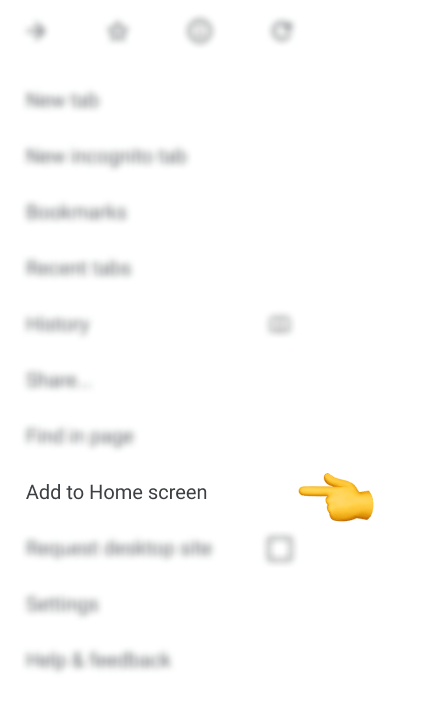
- Tap the three-dot menu in the top-right corner
- Select "Add to Home screen" from the dropdown
- Confirm the app name (default: "Realz")
- Tap "Add" to create the shortcut
- Choose "Add to Home screen" when prompted
- Access your shortcut from the home screen or app drawer
Alternative Method:
- Look for the "Add to Home screen" banner at the bottom of the page
- Tap "Add" when prompted
- Follow the automatic setup process
Android Features:
- Progressive Web App (PWA) functionality
- Offline game loading capabilities
- Native Android integration
- Background updates for promotions
- Hardware acceleration for smooth gameplay
Benefits of Mobile Shortcuts
Why create a mobile casino access realz shortcut?
Instant Access:
- One-tap entry to your account
- Skip typing URLs or searching bookmarks
- Immediate access to live casino games
- Quick check of current jackpots
Enhanced Experience:
- Full-screen gaming without browser distractions
- Faster load times compared to browser bookmarks
- App-like navigation and interface
- Optimized touch controls for mobile gaming
- Better integration with device notifications
Convenience Features:
- Automatic login retention
- Quick access to promotions
- Easy deposit and withdrawal processes
- Instant customer support through help centre
Security Advantages:
- Direct connection to official Realz website
- No third-party app store risks
- Automatic security updates
- Protected by your device's built-in security
Troubleshooting Tips:
Shortcut Not Working?
- Ensure you have a stable internet connection
- Clear browser cache and cookies
- Update your browser to the latest version
- Restart your device after creating the shortcut
Missing Icon?
- The Realz logo should appear automatically
- If missing, delete and recreate the shortcut
- Ensure you're using the official realz.co.nz domain
Performance Issues?
- Close other apps to free up memory
- Check your internet speed (minimum 2Mbps recommended)
- Consider switching between WiFi and mobile data
Need additional help? Contact our support team through the casino app shortcut ios android setup process or visit our comprehensive help centre.
Create Your Shortcut & Start Playing
Enjoy instant access to premium realz quick access nz gaming wherever you are!

.webp)
.webp)